
It’s 9:43 p.m. on a Tuesday.
The dinner dishes are done. The house is finally quiet. You’ve changed into something comfortable, and you’re about to settle into bed when you notice a familiar glow coming from downstairs.
The kitchen lights are still on.
Again.
You walk down, switch them off, and remember that the thermostat has been heating the house all evening—even though everyone spent the last three hours upstairs.
It’s not a disaster. Just another collection of tiny things that slipped through the cracks of a busy day.
But those small moments can add up.
Now imagine a different evening.
The kitchen lights switch off automatically after everyone leaves. Your thermostat follows a schedule that makes sense for your household. The office lamp doesn’t stay on until midnight because someone forgot about it.
And you?
You get to enjoy your evening without mentally checking every switch in the house.
That’s the real appeal of a smart home energy saving routine.
It’s not about filling your home with expensive gadgets or turning everyday life into a technology experiment.
It’s about making your home work a little more thoughtfully, even when you’re busy doing something else.
Here are seven practical steps to help you create energy-saving automation that fits your life, respects your comfort, and actually makes sense.
Quick Answer: What Is a Smart Home Energy Saving Routine?
A smart home energy saving routine is a set of automated actions that helps reduce unnecessary electricity, heating, or cooling use.
For example, smart lights can switch off when a room is empty, a compatible thermostat can adjust temperatures during planned absences, and smart plugs can control suitable devices on a schedule.
The key is to automate useful habits rather than automate everything.
Savings depend on your equipment, existing behavior, utility rates, and household schedule.
Why Smart Home Energy Saving Routines Are Worth Trying
Think about all the little decisions you make at home.
Turning on a light. Adjusting the temperature. Unplugging a device. Remembering to switch something off before leaving.
None of those tasks seems difficult.
But when you’re balancing work, family responsibilities, and everything else life throws at you, remembering every detail becomes exhausting.
Automation reduces some of that mental workload.
Better still, it can help prevent devices from operating when nobody needs them.
Heating and cooling deserve particular attention. According to ENERGY STAR, certified smart thermostats have demonstrated energy savings using real-world performance data.
But you don’t need to automate your entire home to benefit.
Start with the routine you forget most often.
That’s where our first step begins.
Step 1: Build Your Smart Home Energy Saving Routine Around One Habit
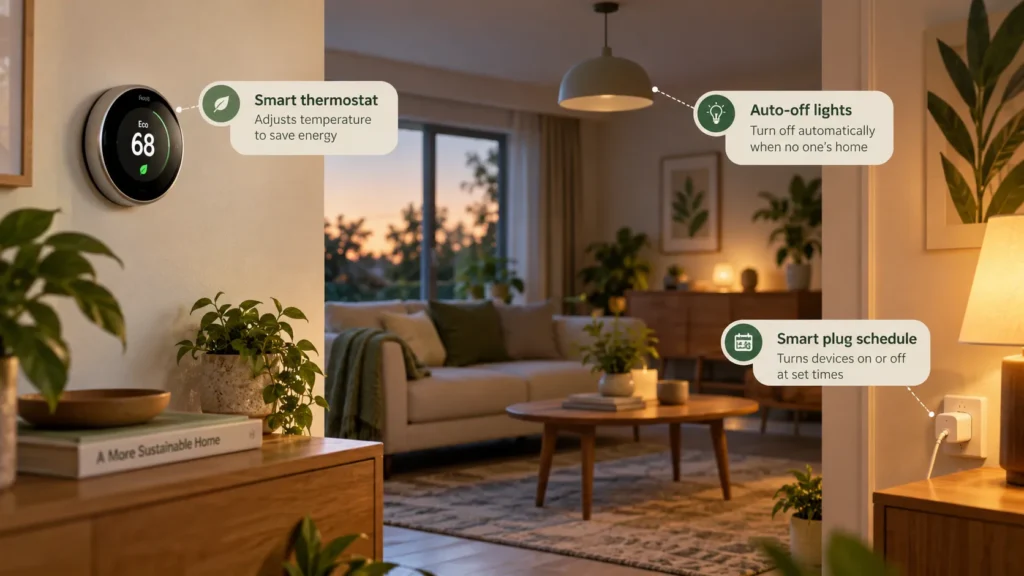
Before buying another device, pay attention to what actually happens in your home.
Which light stays on after everyone leaves?
Does the thermostat maintain the same setting all day, even when the house is empty?
Is there a desk lamp that regularly runs long after you’ve finished working?
Choose one behavior that happens frequently enough to be worth addressing.
For example, if your home office is usually empty after 6 p.m., scheduling a compatible lamp to switch off around that time may make sense.
Don’t worry about connecting every room immediately.
A successful first routine gives you something more valuable than a complicated dashboard: confidence that the automation works.
Try this: Spend two days observing your household habits. Write down one repeated instance of unnecessary energy use and decide whether a simple timer, sensor, or schedule could prevent it.
Once you’ve identified a useful habit, consider the device that often has the greatest influence on household energy consumption.
Your thermostat.
Step 2: Create a Smart Thermostat Schedule That Matches Real Life
Picture coming home on a freezing winter evening.
You open the door, step inside, and immediately regret setting the thermostat too low.
Saving energy shouldn’t mean arriving home to an uncomfortable house.
That’s why thoughtful thermostat scheduling matters.
A compatible smart thermostat can follow your household’s typical occupancy patterns, adjusting heating or cooling settings when people are away or asleep.
Some models support geofencing, which uses a phone’s location to help determine when household members leave or return.
But automatic settings are only useful when they match reality.
If someone works from home, has an unpredictable schedule, or needs stable indoor temperatures, an aggressive away setting may be inconvenient or inappropriate.
And if you use a heat pump, large heating setbacks may activate auxiliary resistance heating on certain systems, potentially reducing savings.
Always follow equipment-specific recommendations.
A better approach: Start with a comfortable, modest schedule, observe how your HVAC system responds, and adjust gradually.
For additional guidance, explore our smart thermostat guide and traditional vs. smart thermostat comparison.
Once heating and cooling are under control, there’s another everyday habit worth automating.
The lights.
Step 3: Use Smart Lighting Automation Without Losing Convenience
There’s something lovely about coming home to a softly lit hallway.
There’s considerably less charm in discovering that the same lights stayed on all afternoon while nobody was home.
Smart lighting automation can solve both problems.
You can program compatible bulbs, switches, or plugs to operate according to schedules or occupancy.
An entryway light might turn on near sunset. A home-office lamp could switch off after work. A closet sensor might activate lighting only when someone enters.
The trick is choosing controls that fit how people use the room.
An occupancy sensor may work beautifully in a hallway but become frustrating in an office where someone sits quietly reading.
Outdoor lighting also deserves seasonal attention because sunset changes throughout the year.
Whenever possible, choose controls that allow easy manual overrides.
For more ideas, explore our smart lighting for home offices guide.
Remember, efficient LED bulbs already use much less electricity than older incandescent bulbs. Automation can reduce unnecessary operating hours, but buying smart bulbs alone doesn’t guarantee additional savings.
Step 4: Add Smart Plugs Where They Actually Make Sense
Smart plugs are appealing because they can turn an ordinary compatible device into one you can schedule.
You don’t necessarily need a new lamp or an entirely connected entertainment system.
Sometimes, a small plug is enough.
For example, a decorative lamp that regularly stays on after bedtime could follow a simple evening schedule.
Certain smart plugs also monitor electricity consumption, helping you understand how much power a connected device uses.
That’s useful when you’re curious about a device’s operating pattern rather than guessing.
However, electrical safety comes first.
Check the smart plug’s power rating, the appliance instructions, and whether the device is appropriate for remotely controlled switching.
Avoid using general-purpose smart plugs for space heaters, medical equipment, refrigerators, or other high-risk or continuously operating appliances unless the manufacturers explicitly approve the application.
A convenient routine isn’t worth introducing a safety hazard.
Our guide to smart plugs for energy monitoring explains which features to compare.
Now that you’ve selected devices, the next challenge is making them work together without creating confusion.
Step 5: Keep Your Energy Saving Automation Simple
Here’s an uncomfortable truth about smart homes.
Sometimes, the technology designed to make life easier becomes another source of frustration.
You open three different apps, discover that a sensor has disconnected, and spend fifteen minutes trying to understand why the living room light switched off.
Sound familiar?
The solution isn’t always another device.
Often, it’s simplification.
Choose one compatible ecosystem where practical. Give devices recognizable names, such as “Living Room Lamp” instead of “Smart Plug 04.”
Keep routines short enough that you can explain what triggers them and what happens next.
Also, make sure everyone in the household can manually override important settings.
Wi-Fi outages, disconnected devices, and software problems are part of connected-home ownership.
An energy-saving routine should remain manageable when something stops working.
Quick test: Run each automation while you’re home. Check weekday behavior, weekends, unexpected occupancy, and what happens after a power interruption.
If nobody understands why a device turned off, simplify the routine before adding another one.
Step 6: Measure Whether Your Smart Home Energy Saving Routine Works
This is the step many people skip.
They install smart devices, watch the automation run successfully, and assume their electricity bill must be lower.
But automation and energy savings aren’t the same thing.
A schedule may work perfectly while making almost no difference to actual consumption.
That’s why measuring matters.
Before activating a routine, record the device’s typical operating schedule or available energy readings.
Then compare similar periods after several weeks.
If your utility offers hourly electricity usage data, look for changes in when energy is consumed.
A compatible monitoring plug can provide more detail about certain individual devices.
For a broader comparison, read our home energy monitor vs. smart plug guide.
Remember that weather, occupancy, and seasonal demand can influence your bills.
One lower bill doesn’t necessarily prove the automation caused the change.
The most useful question is simple:
Did this routine reduce unnecessary device operation without creating inconvenience?
If the answer is yes, you’ve found something worth keeping.
If not, adjust it or remove it.
Step 7: Review Your Smart Home Energy Saving Routine Every Season
The routine that makes sense in January may not make sense in July.
Winter means shorter days, increased heating needs in many regions, and different patterns of indoor activity.
Summer brings longer evenings, cooling demands, and sometimes changing electricity rates.
Your daily life changes, too.
Children go on vacation. Work schedules shift. Guests visit. Someone starts working from home.
Good automation should adapt to those changes.
Set aside a few minutes every season to review thermostat schedules, lighting timers, device connections, and manual controls.
Make sure automation still fits the household rather than forcing everyone to work around outdated settings.
This small review prevents a useful system from gradually becoming an annoying one.
A Realistic Smart Home Energy Saving Routine Example
Here’s what a simple weekday routine could look like for a household where everyone usually leaves during the day.
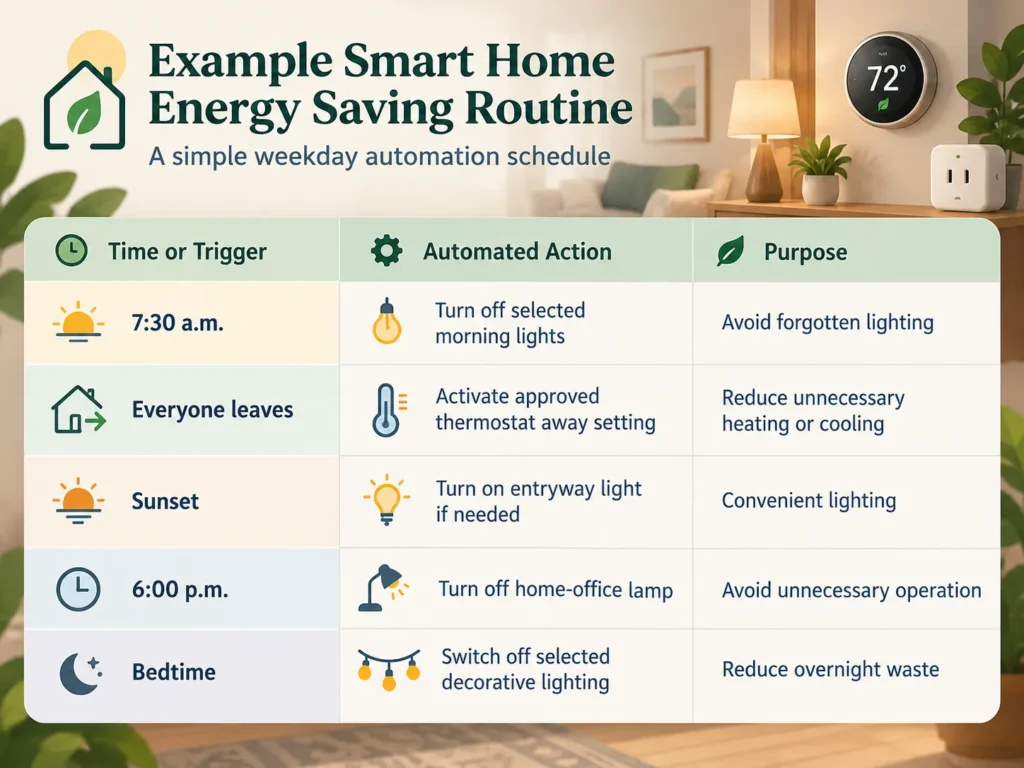
These are examples, not universal recommendations.
The actual settings should reflect your routine, appliance safety requirements, and preferred comfort levels.
The important part isn’t the number of actions.
It’s whether each action serves a useful purpose.
5 Common Smart Home Energy Saving Mistakes
Even a carefully planned system can disappoint when the basics are overlooked.
- Automating everything immediately: Start with one useful routine and expand after testing.
- Ignoring HVAC compatibility: Temperature adjustments should follow the needs of your specific heating and cooling system.
- Using smart plugs with unsuitable appliances: Check electrical ratings and manufacturer guidance before connecting equipment.
- Creating routines nobody understands: Simple automation with manual controls is usually easier to live with.
- Assuming every automated action saves money: Track actual operating patterns instead of relying on marketing claims.
It’s also worth considering other household members.
A lighting schedule that works perfectly for you may inconvenience someone who enjoys reading late at night.
Talk through shared routines before enabling them.
The smartest home is one that makes life easier for everyone living there.
Frequently Asked Questions About Smart Home Energy Saving Routines
Do smart home routines actually save electricity?
Smart home routines can reduce electricity consumption when they prevent unnecessary operation of compatible devices. Actual savings depend on the equipment, previous habits, frequency of use, and local electricity rates. Automating an efficient device that rarely runs may produce minimal savings.
What is the best smart home energy saving routine for beginners?
The easiest starting point is automating one frequently forgotten, low-risk action, such as switching off a decorative lamp on a schedule. Test the routine, keep manual control available, and check whether it reduces unnecessary operating time.
Can smart thermostats lower energy bills?
Yes. ENERGY STAR-certified smart thermostats have demonstrated energy savings under real-world conditions. However, individual results vary with climate, heating and cooling equipment, occupancy, existing settings, and household behavior.
Do smart plugs reduce energy consumption automatically?
Not necessarily. A smart plug mainly allows compatible devices to be controlled or scheduled. Some models also measure electricity usage. Savings happen when the plug actually reduces unnecessary consumption.
Can I create energy-saving automation without a smart home hub?
Yes. Many compatible smart plugs, bulbs, and thermostats support basic schedules through their own apps. A dedicated hub becomes more useful when coordinating multiple devices or building complex routines across supported systems.
How often should I update my energy-saving routines?
Review your routines whenever seasons, occupancy, work schedules, or equipment change. A brief seasonal check is a practical starting point. Update settings sooner if they cause discomfort, unexpected operation, or safety concerns.
Final Thoughts: A Smarter Home Should Give You Time Back
Remember that quiet Tuesday evening?
The forgotten kitchen lights. The heating running longer than needed. One more trip downstairs before bed.
A thoughtfully designed smart home won’t eliminate every little inconvenience.
But it can take a few repetitive decisions off your shoulders.
That’s what makes a smart home energy saving routine worthwhile.
You don’t need dozens of connected devices or an elaborate system that requires constant attention.
Start with one habit. Automate it safely. Measure what changes.
Then let your home handle that small task while you spend your attention on something that matters more.
Ready to take the next step? Explore our ultimate home automation system guide and discover how to build a connected home around your actual needs